









The DEWA login portal allows residents, businesses, and organizations in Dubai to access online services provided by the Dubai Electricity and Water Authority. Through this secure portal, customers can manage electricity and water services, pay bills, track requests, and monitor consumption conveniently online.
DEWA is the main utility provider responsible for supplying electricity and water across Dubai. To simplify customer interactions, the authority provides digital services through its official website and smart applications.
In this guide, we will explain how the DEWA login system works, how to create an account, and what services are available after signing in.
What is DEWA?
The Dubai Electricity and Water Authority is the government organization responsible for providing electricity and water services in Dubai. The authority focuses on delivering reliable utilities, innovative digital services, and sustainable energy solutions for residents and businesses.
DEWA offers several online services that allow customers to manage their utility accounts without visiting physical service centres. Through the login portal, users can handle supply activation, bill payments, service requests, and other utility-related tasks digitally.
DEWA Login Portal
Users can access the official login page here: https://www.dewa.gov.ae/en/consumer/my-account/login
The login system allows customers to sign in as:
- Consumer
- Builder
- Supplier
- Government user
- Job seeker
- Other registered users
Individuals with an Emirates ID can log in using UAE PASS, while businesses and other users can sign in with their DEWA username and password.
Steps to Login to DEWA Account
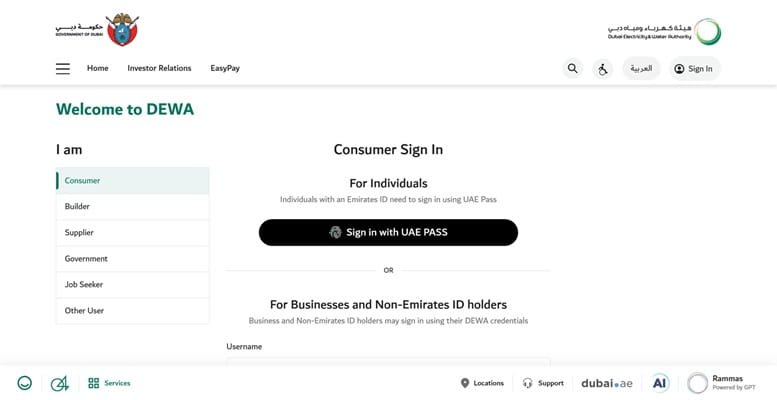
Follow these simple steps to access your DEWA account:
- Visit the official DEWA login page.
- Select the appropriate user category (consumer, builder, supplier, etc.).
- Enter your username and password.
- Alternatively, choose Login with UAE PASS.
- Click the Sign In button.
- Once authenticated, you will be redirected to your customer dashboard.
After logging in, users can access multiple electricity and water services from a single platform.
How to Register for a DEWA Online Account
If you are a new customer, you must create an online profile before using DEWA services.
Registration Steps
- Visit the official DEWA website.
- Click on Create Online Profile on the login page.
- Enter personal details such as name, email address, and mobile number.
- Verify your identity through UAE PASS or email verification.
- Create login credentials.
- Activate your account and sign in.
After completing registration, users can manage all electricity and water services online.
Services Available After DEWA Login
The DEWA portal provides many services for residents and businesses in Dubai.
- Electricity and Water Bill Payment
Customers can check monthly bills and pay them online through credit card, debit card, or bank services.
- Activation of Electricity and Water (Move-In)
New tenants or property owners can activate utilities when moving into a new property.
- Move-Out or Transfer Services
Customers can deactivate services or transfer electricity and water accounts to another property.
- Consumption Monitoring
Users can monitor electricity and water usage through smart meters and digital dashboards.
- Request Tracking
The portal allows users to track service requests, complaints, and technical notifications.
Benefits of Using the DEWA Login Portal
The DEWA online portal offers several advantages for customers.
Convenient Online Services: Customers can manage their utility accounts anytime without visiting service centres.
Secure Digital Access: Login through UAE PASS ensures strong identity verification and security.
Quick Bill Payments: Users can pay electricity and water bills instantly online.
Smart Consumption Monitoring: Customers can track energy and water usage to make better sustainability decisions.
Centralized Utility Management: All electricity and water services are accessible through a single account.
Common DEWA Login Issues and Solutions
Forgot Username or Password
Use the “Forgot Username” or “Forgot Password” option on the login page to reset credentials.
Account Not Activated
Ensure that your online profile has been successfully created and verified before attempting to log in.
Browser Compatibility Issues
DEWA recommends using modern browsers such as Chrome, Firefox, Safari, or Edge for better performance.
Login Session Timeout
The system automatically logs users out after a period of inactivity for security reasons.
Conclusion
The DEWA login portal is an essential digital platform for residents and businesses in Dubai to manage electricity and water services easily. By providing secure access through UAE PASS and online credentials, the portal allows users to pay bills, activate utility services, track requests, and monitor consumption efficiently.
As Dubai continues to expand its digital government ecosystem, DEWA’s online services help improve convenience, sustainability, and service delivery for millions of customers across the emirate.
FAQs About DEWA Login
Q1. What is DEWA login?
DEWA login is the online account access system that allows customers to manage electricity and water services provided by the Dubai Electricity and Water Authority.
Q2. Can I login to DEWA using UAE PASS?
Yes. Individuals with an Emirates ID can log in using UAE PASS for secure authentication.
Q3. What services can I access after DEWA login?
You can pay bills, activate or deactivate electricity and water services, track requests, and monitor consumption.
Q4. Is DEWA registration required to use online services?
Yes. Users must create an online profile before accessing DEWA digital services.
Q5. Can businesses use the DEWA portal?
Yes. Businesses, suppliers, builders, and government entities can also access specific services through the portal.
Q6. What should I do if I forget my DEWA password?
You can reset your password through the “Forgot Password” option on the login page.
Q7. Is the DEWA portal available 24/7?
Yes. The DEWA website and smart services are available online at any time.