








The DHA login portal is an online gateway provided by the Dubai Health Authority that allows healthcare professionals, medical facilities, and organizations to access various digital health services in Dubai. Through the official Sheryan portal, users can manage licensing, registration, and other healthcare-related services online.
Healthcare professionals working in Dubai often need to access this portal to apply for licenses, update professional information, or manage facility registrations. The system simplifies many administrative tasks by providing a secure digital platform.
In this article, we will explain what DHA login is, how to access the portal, the registration process, and common services available through the system.
What is DHA Login?
The DHA login refers to accessing the online services portal of the Dubai Health Authority through the Sheryan system. This portal acts as a digital platform where healthcare professionals and medical facilities can register, apply for licenses, and manage healthcare services in Dubai.
The portal offers a single sign-on system, which means users can access multiple DHA e-services using a single account. Individuals or companies can create an account and manage their healthcare licensing and regulatory processes from one place.
This online platform plays a major role in regulating and monitoring the healthcare sector in Dubai.
DHA Login Portal
Users can access the official portal using the link below: https://services.dha.gov.ae/sheryan/wps/myportal/home/applications
Once you open the page, you will see the login interface where you can enter your username and password. The portal also provides the option to log in using UAE PASS, which is a secure digital identity used across many government services in the UAE.
Steps to Login to the DHA Portal
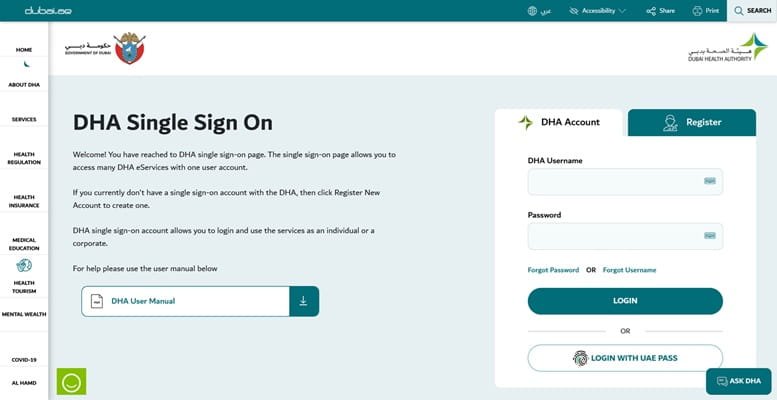
Follow these simple steps to log in to the DHA system:
- Visit the official DHA Sheryan login portal.
- Enter your DHA username.
- Type your password in the required field.
- Click on the Login button.
- Alternatively, choose Login with UAE PASS for faster authentication.
After successful login, you will be redirected to your DHA dashboard, where you can access available healthcare services.
How to Register for a DHA Account
If you are a new user, you must create an account before logging in. Here are the steps:
- Go to the DHA login page.
- Click on Register New Account.
- Enter personal details such as name, email address, and contact information.
- Create a username and password.
- Verify your account through email or OTP verification.
- Log in to your newly created account.
Once the registration is completed, users can access various DHA services online.
Services Available After DHA Login
The DHA portal offers a wide range of digital services for healthcare professionals and medical institutions. Some of the major services include:
- Professional Licensing
Healthcare professionals such as doctors, nurses, pharmacists, and technicians can apply for DHA licenses through the portal.
- License Renewal
Existing DHA license holders can renew their professional licenses online before the expiration date.
- Healthcare Facility Registration
Hospitals, clinics, and healthcare centers can register their facilities and manage regulatory approvals through the system.
- Medical Registry Access
Users can check the official registry of healthcare professionals and facilities registered with DHA.
- Circulars and Regulatory Updates
The portal also provides access to official circulars and updates issued by the healthcare regulation sector.
Benefits of Using the DHA Login Portal
The DHA Sheryan portal offers several benefits for healthcare professionals and organizations in the UAE.
Convenient Online Access: Users can manage licensing and regulatory processes online without visiting DHA offices.
Single Sign-On System: A single account allows access to multiple DHA e-services.
Faster Application Processing: Digital applications reduce paperwork and speed up approval processes.
Secure Authentication: Integration with UAE PASS ensures secure login and identity verification.
Centralized Healthcare System: The portal acts as a central system for regulating Dubai’s healthcare workforce and facilities.
Common DHA Login Issues and Solutions
Sometimes users may experience login problems. Here are some common issues and solutions:
Forgot Username or Password: Use the “Forgot Password” or “Forgot Username” option on the login page.
Browser Issues: Ensure that your browser allows cookies and JavaScript to run properly.
Account Verification Problems: If verification fails, try logging in through UAE PASS or contact DHA support.
Technical Errors: Clear browser cache or try using another browser or device.
If the issue persists, users can contact DHA customer support for assistance.
Conclusion
The DHA login portal is an essential online system for healthcare professionals and organizations working in Dubai. Managed by the Dubai Health Authority, the platform allows users to access licensing services, manage healthcare facility registrations, and stay updated with regulatory changes.
With features such as single sign-on access, digital licensing services, and UAE PASS authentication, the DHA portal simplifies many administrative processes within Dubai’s healthcare sector. Healthcare professionals planning to work in Dubai or manage medical facilities should familiarize themselves with the DHA login system to efficiently handle their professional requirements.