







The TLS login portal is an online platform developed by the Ministry of Education (MOE) of the United Arab Emirates. It allows teachers, educators, and school professionals to register for the Teacher Licensing System (TLS) and manage their professional licensing requirements.
The platform plays an important role in improving the quality of education in the UAE by ensuring that teachers meet professional standards. Through the TLS portal, educators can register for licensing exams, upload documents, and track their certification progress.
In this article, we will explain what the TLS login portal is, how to access it, the registration process, and the services available after logging in.
What is TLS (Teacher Licensing System)?
The Teacher Licensing System (TLS) is an initiative launched by the UAE Ministry of Education to ensure that teachers working in schools meet professional teaching standards. The system evaluates teachers through professional tests and qualifications verification before issuing a teaching license.
Through TLS, teachers are required to demonstrate their knowledge of teaching methods and subject expertise. The platform helps maintain a consistent standard for educators working in public and private schools across the UAE.
Teachers who successfully complete the licensing requirements receive a professional teaching license from the Ministry of Education.
TLS Login Portal
The official TLS portal can be accessed using the following links:
After visiting the page, users must enter their login credentials to access the system. The portal is designed for teachers, school administrators, and education professionals who need to manage licensing applications and examinations online.
The TLS portal is part of the broader digital services offered by the UAE Ministry of Education, which provides several online platforms for education services and professional licensing.
Steps to Login to TLS Portal
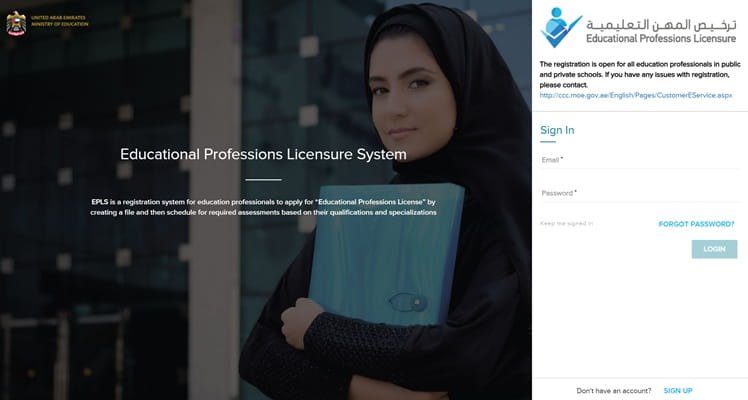
Logging into the TLS platform is simple. Follow these steps:
- Visit the official TLS login page.
- Enter your registered email or username.
- Type your password in the login field.
- Complete any security verification if required.
- Click the Login button.
- After successful login, you will be redirected to the TLS dashboard.
From the dashboard, users can access licensing services, exam registration, and profile management tools.
How to Register for a TLS Account
If you are a new user, you must create an account before accessing TLS services.
Registration Process
- Visit the TLS portal.
- Click on Register / Create Account.
- Enter personal details such as:
- Full name (as per Emirates ID)
- Emirates ID number
- Email address
- Mobile number
- Upload required documents.
- Submit the application for verification.
Once approved, users receive login credentials that allow them to access the TLS platform and complete licensing procedures.
Schools often assist teachers with the TLS registration process as part of employment requirements.
Documents Required for TLS Registration
Teachers may need to upload several documents when registering for the Teacher Licensing System. These may include:
- Passport copy
- Emirates ID copy
- Academic degree certificates
- Teaching experience certificates
- Professional training certificates
These documents help the Ministry of Education verify qualifications before allowing teachers to take licensing exams.
Services Available After TLS Login
Once logged into the TLS portal, teachers and education professionals can access several services.
- Teacher License Application
Educators can apply for their official UAE teaching license through the portal.
- Examination Registration
Teachers can register for subject-specific and pedagogy exams, which are required to obtain the teaching license.
- Document Upload and Verification
The platform allows users to upload qualification documents for review by the Ministry of Education.
- Exam Results and Status Tracking
Teachers can check their exam results and monitor the progress of their licensing application.
- Professional Development Information
The portal may also provide updates related to teacher training programs and certification requirements.
Benefits of Using the TLS Portal
The Teacher Licensing System offers several advantages for educators in the UAE.
Improved Education Standards: The licensing system ensures that teachers meet professional teaching requirements.
Digital Application Process: Teachers can manage licensing procedures online without visiting offices.
Centralized Teacher Database: The system maintains records of licensed teachers and their qualifications.
Transparent Evaluation System: Teachers can track exam results and application status directly through the portal.
Support for Professional Growth: TLS encourages teachers to enhance their knowledge and teaching skills.
Conclusion
The TLS login portal is an important platform for educators in the UAE who need to obtain and manage their teaching licenses. Developed by the Ministry of Education, the Teacher Licensing System ensures that teachers meet professional standards and possess the necessary qualifications to teach in UAE schools.
By providing online services such as exam registration, document verification, and license tracking, the TLS portal simplifies the licensing process and supports the UAE’s commitment to high-quality education.
FAQs About TLS Login
Q1. What is TLS login?
TLS login is the authentication system that allows teachers and education professionals to access the UAE Teacher Licensing System portal.
Q2. Who needs to use the TLS portal?
Teachers working in UAE public and private schools must use TLS to apply for professional teaching licenses.
Q3. What services are available on the TLS portal?
Users can apply for teaching licenses, register for exams, upload documents, and track licensing status.
Q4. Is TLS mandatory for teachers in the UAE?
Yes, the Teacher Licensing System is part of the UAE’s initiative to ensure that educators meet national teaching standards.
Q5. What exams are required in TLS?
Teachers usually need to pass pedagogy exams and subject-specific tests to obtain their professional license.
Q6. How do I reset my TLS password?
You can reset your password using the Forgot Password option on the login page.
Q7. Can schools register teachers on TLS?
Yes, many schools assist teachers with registration and document submission during the licensing process.