








The Calogi login portal is an online platform designed for companies and professionals working in the air cargo and logistics industry. Through this portal, airlines, freight forwarders, logistics providers, and cargo agents can access a wide range of digital tools that help manage air cargo operations more efficiently.
Calogi plays a key role in simplifying cargo supply-chain operations by providing a paperless, centralized system where industry stakeholders can interact, manage shipments, and perform logistics tasks online. In this guide, we explain what the Calogi login portal is, how to access it, how to register, and the services available after logging in.
What is Calogi?
Calogi is an air cargo supply-chain portal launched in 2008 in Dubai. It provides a comprehensive digital platform for businesses involved in air freight and logistics operations.
The platform connects various industry stakeholders such as:
- Airlines
- Freight forwarders
- General sales agents (GSAs)
- Ground handling companies
- Third-party logistics providers
Calogi allows these participants to collaborate through a single electronic system, helping them manage shipments, share information, and conduct transactions online.
The name Calogi stands for Cargo Logistics International, highlighting its role in global cargo operations.
Calogi Login Portal
Users can access the official login page through the Calogi website: https://www.calogi.com/calogi/app?service=page/clwp:CalogiMemberLogin
After opening the login page, registered users must enter their username and password to access the platform dashboard.
The portal provides secure online access where members can manage logistics operations and monitor shipments in real time.
Steps to Login to Calogi
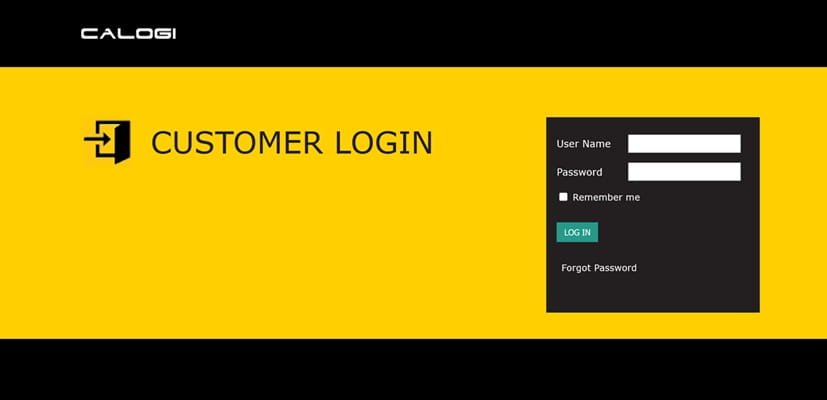
Logging into the Calogi portal is straightforward. Follow these steps:
- Visit the official Calogi login page.
- Enter your registered username.
- Type your password in the required field.
- Click the Login button.
- After successful authentication, you will be redirected to the Calogi dashboard.
From the dashboard, users can access cargo booking tools, shipment management features, and other logistics services.
How to Register for a Calogi Account
If you are a new user or company, you must register to use the platform.
Registration Process
- Visit the official Calogi website.
- Click on the Register option.
- Complete the membership registration form with your company details.
- Submit the application.
- A Calogi representative will contact you to verify the information and activate the account.
Once approved, you will receive login credentials to access the platform.
Services Available After Calogi Login
The Calogi portal provides several digital services for cargo and logistics operations.
- Cargo Booking and Shipment Management
Users can book cargo shipments and manage logistics operations through an integrated system.
- Air Waybill and Documentation Management
The platform supports electronic documentation such as e-Air Waybills, reducing paperwork and improving efficiency.
- Real-Time Reporting
Businesses can access real-time sales, inventory, and shipment reports to make better decisions.
- Rate Management and Pricing
Airlines and cargo agents can publish rates, promotional prices, and customer-specific pricing.
- Communication Between Cargo Stakeholders
Calogi enables seamless communication between airlines, forwarders, and logistics providers through one digital platform.
Benefits of Using the Calogi Portal
The Calogi system offers several advantages for the cargo industry.
Paperless Logistics Operations: The platform reduces manual paperwork by enabling electronic cargo documentation and transactions.
Centralized Cargo Management: All supply-chain participants can interact through one digital portal.
Improved Efficiency: Automation helps reduce delays and administrative work.
Real-Time Information Access: Businesses can track shipments and cargo operations instantly.
Better Collaboration: The platform allows different stakeholders to communicate and conduct business online.
Calogi Contact Information
For assistance or business inquiries, users can contact Calogi through the following details:
- Head Office: Freight Gate 5, Block F, 3rd Floor, Dubai Airport Free Zone, Dubai, UAE
- Customer Support: +971 4 2111 333
- Email: helpdesk@calogi.com
The support team is available to assist users with registration, technical issues, and platform services.
Conclusion
The Calogi login portal is an essential digital tool for businesses involved in the air cargo and logistics sector. By offering a centralized platform for cargo booking, documentation, reporting, and communication, Calogi simplifies complex logistics operations and improves efficiency across the supply chain.
With features such as paperless transactions, real-time information access, and seamless collaboration between industry stakeholders, Calogi continues to play an important role in supporting the global air cargo community.
FAQs About Calogi Login
Q1. What is Calogi login?
Calogi login is the authentication system that allows registered users to access the Calogi air cargo logistics platform.
Q2. Who can use the Calogi portal?
Airlines, freight forwarders, logistics companies, GSAs, and cargo agents involved in air cargo operations can use the platform.
Q3. What does Calogi stand for?
Calogi stands for Cargo Logistics International, reflecting its role in global air cargo logistics.
Q4. How do I register for Calogi?
You can register through the official Calogi website by completing the membership registration form.
Q5. What services are available after login?
Users can manage cargo bookings, track shipments, access real-time reports, and handle logistics documentation.
Q6. Is Calogi a secure platform?
Yes, the platform provides secure access and supports electronic data exchange between cargo industry stakeholders.
Q7. Can I track shipments on Calogi?
Yes, users can track shipments using the Track and Trace feature available on the portal.